

Venturing into remote areas—whether for a camping trip, cross-country drive through rural regions, or international travel—often means losing the cellular connectivity we've come to depend on. But losing your signal doesn't have to mean losing your way. With proper preparation, your device can be a reliable navigation tool even without an internet connection.
Understanding GPS vs. Cellular Data
First, let's clear up a common misconception: GPS and cellular service are completely separate systems. Your phone's GPS receiver communicates directly with satellites orbiting Earth—no cell towers required. What you lose without cellular service is:
- The ability to download new map data
- Real-time traffic information
- Online search functionality
- Live rerouting based on current conditions
What you keep: your exact location on the planet, provided you have map data already downloaded.

Preparing Offline Maps Before Your Trip
Download Maps in Advance
Most navigation apps allow you to download maps for offline use. The key is doing this while you still have a strong internet connection:
- Identify all regions you'll be traveling through
- Download maps for each area plus buffer zones around your route
- Include alternate routes in case of road closures
- Update downloads if they're more than a few months old
Storage Considerations
Offline maps can be substantial. A single state might require 200-500MB, while a small country could need several gigabytes. Check your available storage before downloading, and consider using an SD card if your device supports it.
Download Multiple Detail Levels
Some apps offer different detail levels for offline maps. For driving, you need road networks and turn-by-turn data. For hiking, you'll want topographic information. Download what's appropriate for your activities.
Essential Offline Navigation Techniques
Cache Your Planned Route
Before leaving service areas, calculate and cache your entire route. This preserves turn-by-turn directions even without connectivity. Some apps store recent routes automatically, but don't rely on this—actively save routes you'll need.

Mark Important Waypoints
Before you lose signal, save locations as offline waypoints:
- Your accommodation
- Gas stations along your route
- Key landmarks and turn points
- Emergency services locations
- Your starting point (to find your way back)
Use Airplane Mode Strategically
When you know you'll be without service, enable airplane mode but keep GPS active. This prevents your phone from constantly searching for cell towers (which drains battery rapidly) while maintaining satellite navigation capability.
Battery Conservation in Offline Mode
Navigation is power-intensive. Dim your screen, close unnecessary apps, and bring a car charger or portable battery pack. Consider downloading maps at lower detail levels to reduce processing demands.
Backup Navigation Methods
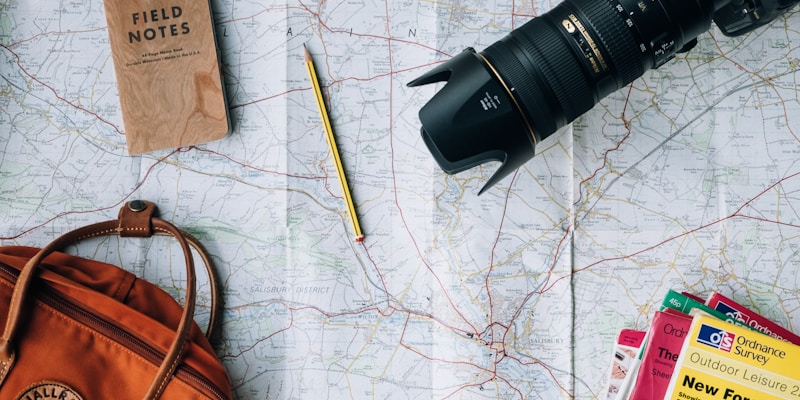
Carry Physical Maps
Technology can fail. A paper map doesn't need batteries, doesn't break when dropped, and works in any weather. For remote travel, always pack:
- A regional road atlas
- Detailed maps of your specific destination area
- A compass for orientation
Learn Basic Map Reading
Knowing how to read physical maps is a valuable backup skill. Understand contour lines, map legends, and how to orient a map using landmarks or a compass.
Note Landmarks Along Your Route
Before entering offline areas, study your route and memorize key landmarks: river crossings, mountain passes, distinctive buildings, or road junctions. These serve as confirmation points even without digital guidance.
Troubleshooting Common Issues
GPS Signal Problems
GPS works best with a clear view of the sky. If you're getting poor accuracy:
- Move away from tall buildings or dense tree cover
- Position your device near a window in vehicles
- Wait a few minutes for satellite acquisition
- Restart your GPS receiver
Map Data Gaps
If you encounter areas not covered by your downloaded maps:
- Zoom out to see the broader road network
- Use your GPS coordinates with a paper map
- Follow major roads toward population centers where you may regain service
Wrong Turn Recovery
Without real-time rerouting, recovering from a wrong turn requires manual navigation. Stop safely, assess your position on the map, and plan a route back to your intended path—or find an alternative route to your destination.
International Travel Considerations
Traveling abroad presents additional offline navigation challenges:
- Download before departure: Airport and hotel WiFi may be unreliable or slow for large map downloads
- Include phrase translations: Some apps let you download road sign translations offline
- Research local requirements: Some countries require specific documentation for GPS device use
- Convert distances: Know whether your destination uses kilometers or miles
Plan Your Next Adventure
Use our free mapping tools to plan routes and identify areas where you'll need offline navigation.
Start PlanningKey Takeaways
- GPS works without cell service—you just need pre-downloaded map data
- Download maps for your entire route plus surrounding areas before losing connectivity
- Save important waypoints while you still have service
- Use airplane mode with GPS enabled to conserve battery
- Always carry physical maps as a backup
- Memorize key landmarks before entering offline zones
- For international travel, prepare maps before leaving home